Sniperchain is a professional-grade telegram crypto trading bot for crypto
traders who need real-time Ethereum blockchain monitoring and instant alerts. Our advanced crypto
bot telegram tracks gas prices, whale movements, new Uniswap listings, wallet activities, and
Binance announcements - delivering timely market data directly to your Telegram or Discord channels.
Whether you're optimizing transaction timing with gas alerts, monitoring large token movements, or catching
new token listings with built-in security analysis (powered by Honeypot.is) - Sniperchain provides the tools
you need in today's fast-moving crypto markets. For centralized exchange listings, check out our complete guide to crypto listing alerts covering Binance, Coinbase, KuCoin, OKX, MEXC, Bybit, Bitget, Kraken, Crypto.com, and Gate.io.
Key features include creator background checks, customizable thresholds, dual-channel notifications, and
enterprise-grade reliability with Redis caching and multi-process architecture.
Currently supporting Ethereum mainnet with multi-chain expansion planned.
🤖 Bot Interface Overview
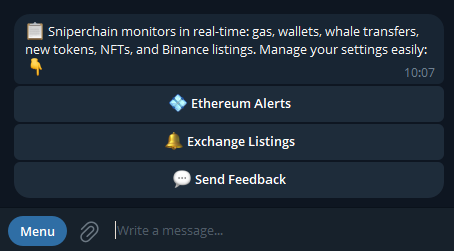
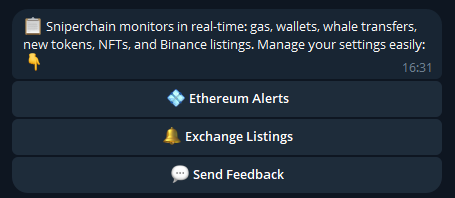
Here's what the Sniperchain bot looks like when you first start using it:
👆 Click "Ethereum Alerts"
⛽Gas Price Monitoring
Real-time Ethereum gas price tracking with smart notifications:
Personalized gas thresholds in Gwei
Rate limiting to prevent notification spam
Dual-channel alerts (Telegram + Discord webhooks)
Historical tracking of recent alerts
Smart filtering for optimal trading moments
📋 How to Set Up Gas Price Alerts
🔧 Threshold Configuration:
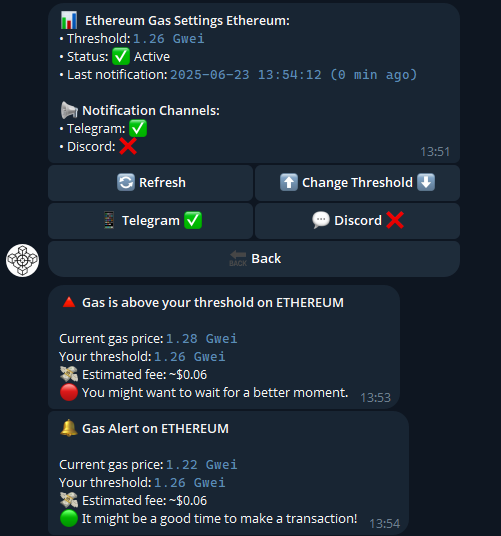
Click the "Settings" → "Change Threshold" button in the bot interface
Set your desired gas fee limit (e.g., 5 Gwei)
The bot will notify you when gas price drops below your threshold
The bot will notify you when gas price rises above your threshold
📢 Notification Channels:
Telegram - Receive messages directly in your chat with the bot
Discord Webhook - Add webhook URL to receive notifications in Discord channel
Dual Channel - Get notifications simultaneously in both Telegram and Discord
Single Channel - Choose to receive alerts only in Telegram or only in Discord
💡 Practical Example:
If you set a threshold of 5 Gwei:
Price drops from 8 → 4 Gwei → You get "Gas below threshold" alert
Price rises from 4 → 7 Gwei → You get "Gas above threshold" alert
Real Bot Interface Screenshots
Here's how the gas monitoring actually works in practice:
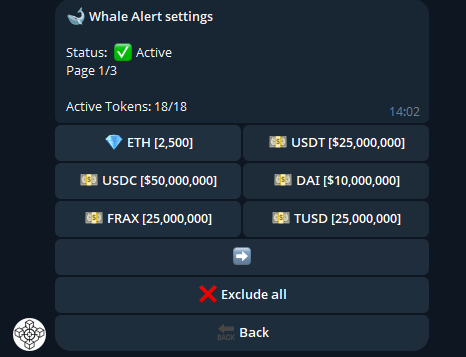
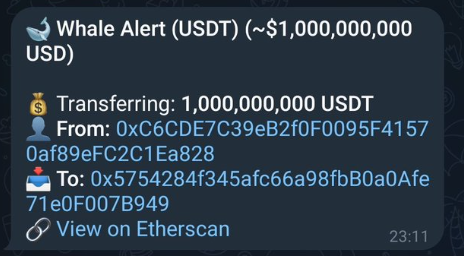
🐋Whale Movement Detection
Advanced whale tracking system with customizable monitoring thresholds:
🎯 Personalized whale thresholds - set your own minimum transaction values
📊 Multi-token whale monitoring across 7 supported assets
🔔 Flexible notification routing (Telegram, Discord, or both platforms)
⚙️ Custom webhook integration for Discord channel
🎛️ Individual user preference controls for alert destinations
⚡ Real-time detection with sub-second notification delivery
📋 How to Set Up Whale Movement Alerts
🎯 Target Configuration:
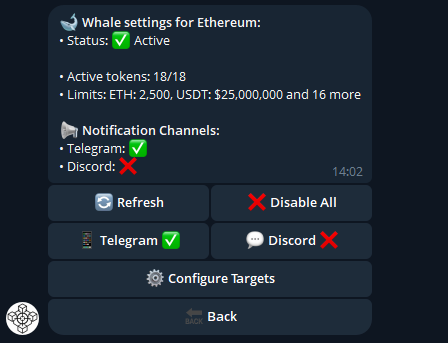
Click the "Settings" → "Configure Targets" button in the bot interface
Choose from 7 supported cryptocurrencies (ETH, USDC, USDT, DAI, etc.)
Set threshold for each currency (e.g., ETH: 10,000)
The bot will notify you when transactions are ≥ your set threshold
You can select one currency or all 7 currencies simultaneously
📢 Notification Channels:
Telegram - Receive messages directly in your chat with the bot
Discord Webhook - Add webhook URL to receive notifications in Discord channel
Dual Channel - Get notifications simultaneously in both Telegram and Discord
Single Channel - Choose to receive alerts only in Telegram or only in Discord
💡 Practical Example:
If you set a threshold of 10,000 ETH:
Transaction of 15,000 ETH → You get "Whale movement detected" alert
Transaction of 8,000 ETH → No notification (below threshold)
🔧 Flexibility Options:
Monitor only ETH transactions with custom thresholds
Track only stablecoins (USDC, USDT, DAI) for large movements
Monitor all 7 currencies with different thresholds for each
Supported Tokens
💎 ETH • 💰 USDC • 💰 USDT • 🔶 DAI •⚡ WETH • 🔒 stETH • ₿ WBTC
Real Bot Interface Screenshots
See how whale tracking works in the actual bot interface:
🔥DEX Listings Monitor
Our most powerful feature - real-time monitoring of new token listings on Uniswap. For centralized exchange listing alerts (Binance, Coinbase, KuCoin, OKX, MEXC, Bybit, Bitget, Kraken, Crypto.com, Gate.io), read our guide to the best tools for crypto listing alerts:
Real-Time Detection
Uniswap V2 & V3 new pool monitoring
Instant notifications for new tokens
Sub-second alert delivery
Smart duplicate filtering
🛠️ How to Set Up DEX Monitoring:
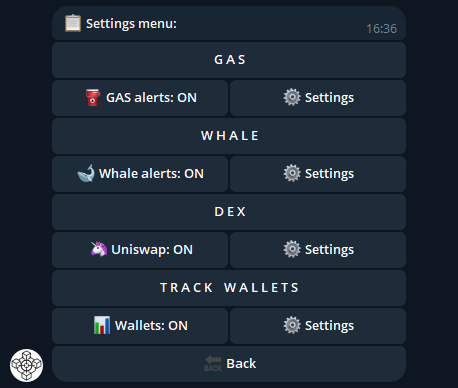
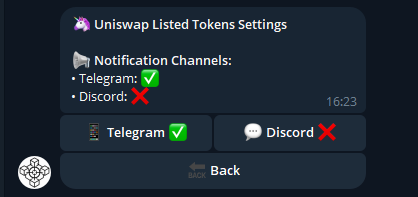
Activate Uniswap: Click "Uniswap: ON"
Done! The bot immediately starts sending newly listed tokens on Uniswap v2/v3
📢 Notification Channels:
Telegram - Receive messages directly in your chat with the bot
Discord Webhook - Add webhook URL to receive notifications in Discord channel
Dual Channel - Get notifications simultaneously in both Telegram and Discord
Single Channel - Choose to receive alerts only in Telegram or only in Discord
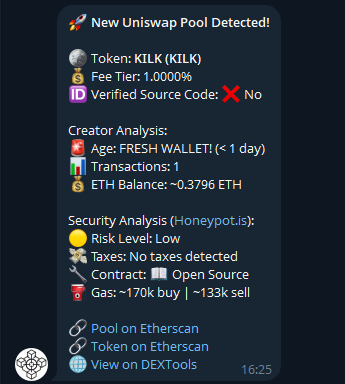
⚡ What You'll Receive:
Creator Analysis - history of the wallet that created the token
Security Analysis - token security analysis thanks to Honeypot.is
Buy Uniswap Link - direct link to purchase the token
Contract Address - for verification and analysis
Listing Time - exactly when the token was added
Real Bot Interface Screenshots
See how DEX listings monitoring works in practice:
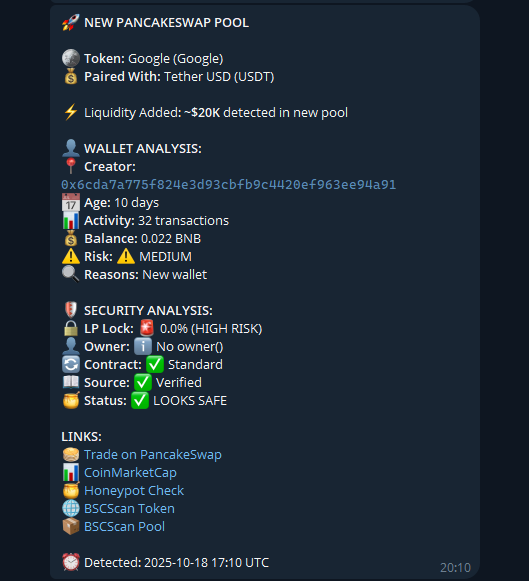
🥞PancakeSwap Listings Monitor (BNB Chain)
Extend your coverage to BNB Chain with instant alerts for new PancakeSwap V2 liquidity pools.
Real-Time Detection
BNB Chain pair monitoring on PancakeSwap V2
Immediate alerts with token pair metadata and liquidity snapshot
Suspicious deployer filtering to reduce noise
Per-user control over Telegram and Discord delivery
🛠️ How to Set Up PancakeSwap Monitoring:
Open BNB Chain Alerts: Tap the "BNB Chain Alerts" button in the bot menu
Select DEX: Enter the "D E X" panel to manage PancakeSwap
Enable PancakeSwap: Toggle "PancakeSwap: ON" to start receiving alerts
Configure Channels: Pick Telegram and/or Discord for notification delivery
⚡ What You'll Receive:
Each alert includes:
Token Pair - contract addresses and symbols for both assets
Liquidity Snapshot - initial liquidity, base token, and USD estimate when available
Creator Insights - deployer wallet information and quick risk signals
PancakeSwap Link - direct trade link to act instantly
📢 Notification Channels:
Telegram - Alerts delivered straight to your chat
Discord Webhook - Mirror activity to your community or trading desk
Dual Channel - Stay synchronized across both platforms
👛Wallet Tracking Ethereum Chain
Monitor Ethereum wallets for every on-chain transaction in real-time. Get alerts for incoming and outgoing
transfers and keep your ETH strategy one step ahead.
Multi-wallet monitoring (track up to 3 wallets simultaneously)
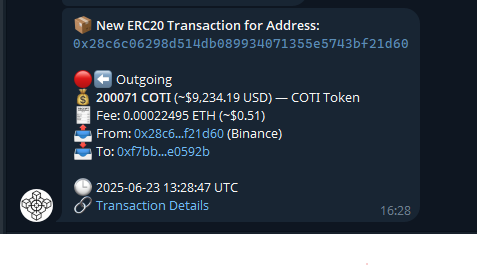
Transaction alerts for incoming/outgoing transfers
Real-time balance checking
Portfolio overview functionality
Direct Etherscan links for transaction verification
🛠️ How to Set Up Wallet Monitoring:
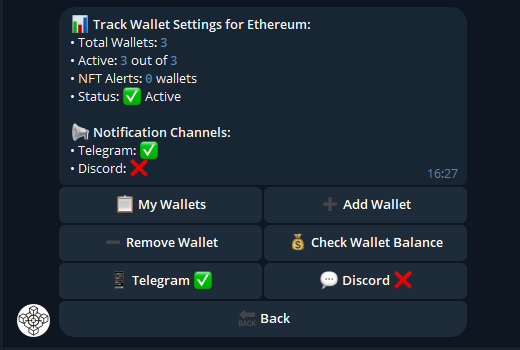
Add Wallet: Click "+Add Wallet" and send the wallet address you want to track
Limit: You can add up to 3 wallets maximum at the moment
Activate Tracking: After adding at least 1 address, go to the main menu and click
"Wallets: ON" to activate tracking
Check Wallets: Use "My Wallets" to see which wallets you have added
Remove Wallet: Use "Remove Wallet" to remove a wallet you no longer want to track
⚡ What You'll Receive:
Incoming Transfers - alerts for all received funds
Outgoing Transfers - alerts for all sent funds
From/To Addresses - information about addresses involved in the transaction
Etherscan Link - direct link to verify the transaction
📢 Notification Channels:
Telegram - Receive messages directly in your chat with the bot
Discord Webhook - Add webhook URL to receive notifications in Discord channel
Dual Channel - Get notifications simultaneously in both Telegram and Discord
Single Channel - Choose to receive alerts only in Telegram or only in Discord
Real Bot Interface Screenshots
See how wallet tracking works in the actual bot interface:
🎨 NFT Tracking Add-on
NFT tracking is an additional feature for your existing wallet monitoring. When you're
already tracking a wallet for incoming and outgoing transactions, you can activate NFT
alerts for the same wallet.
🔧 How it works:
Add wallet for regular tracking → receive token transfers
Activate "NFT Alerts: ON" → start receiving NFT transfers too
Get combined notifications for both token AND NFT activity on the wallet
💡 Practical Example:
Wallet 0x1234...5678 with NFT alerts enabled:
Receives 5 ETH → "Incoming: 5 ETH to 0x1234...5678"
Receives Bored Ape #1234 → "NFT Received: BAYC #1234 to 0x1234...5678"
Sends CryptoPunk #567 → "NFT Sent: CryptoPunks #567 from 0x1234...5678"
👛Wallet Tracking Solana Chain
Bring the same precision monitoring to your Solana strategy. Track key wallets on the Solana chain and receive instant alerts whenever SOL or SPL tokens move.
Track up to 3 Solana wallets simultaneously
Instant alerts for incoming and outgoing SOL or SPL token transfers
Real-time balance snapshots with each notification
Automatic links to Solscan for deeper transaction analysis
Optional Discord mirroring via webhook for team visibility
🛠️ How to Set Up Solana Wallet Monitoring:
Open Solana Chain Alerts: Tap the "Solana Chain Alerts" button in the bot menu
Track Wallets: Select "Track Wallets" to add a Solana address you want to monitor
Wallets Toggle: Switch "Wallets: ON" once you have at least one address configured
Settings: Use "Settings" to remove wallets or adjust alert preferences
⚡ What You'll Receive:
Incoming Transfers - notifications for SOL and SPL deposits
Outgoing Transfers - alerts when tracked wallets send funds
Token Metadata - token symbol, amount, and USD estimation when available
Solscan Link - direct link to inspect the transaction on Solscan
📢 Notification Channels:
Telegram - Receive messages directly in your chat with the bot
Discord Webhook - Add webhook URL to mirror alerts in your Discord server
Dual Channel - Stay synced across both Telegram and Discord in real time
Tip: Combine Ethereum and Solana tracking to follow multi-chain whale activity without switching tools.
🏦Exchange Listings
Get instant exchange listing alerts for new tokens on Binance, Coinbase, KuCoin, OKX, MEXC, Bybit, Bitget, Kraken, Crypto.com, and Gate.io. Our Telegram bot monitors all major centralized exchanges (CEX) and sends you real-time notifications within 2-5 seconds when new tokens are listed. Be the first to know about new trading opportunities.
⚡ Lightning-Fast Detection
We detect and alert you about new token listings within 2-5 seconds after they appear on exchanges!
Be among the first to know and act on new trading opportunities.
Supported Exchanges
🟡Binance
⚪Coinbase
🔷Crypto.com
🔵Kraken
🟠Bybit
🔴MEXC
🟢Bitget
🔵KuCoin
🟢OKX
🟣Gate.io
Discord Integration: Mirror every exchange notification to your Discord server with a single webhook, keeping both Telegram and Discord communities in sync in real time.
🛠️ How to Set Up Exchange Monitoring:
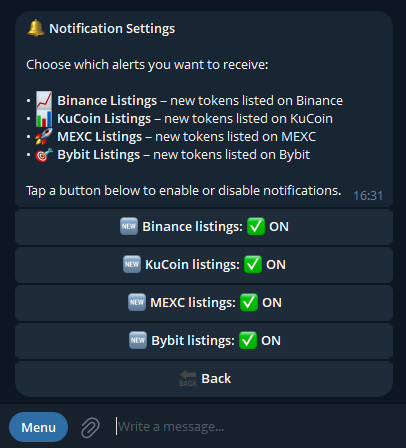
Open Exchange Section: View all available exchanges
Activate Desired Exchanges: Choose which exchanges you want to "listen" to
Done! The bot will notify you about all new listings
📢 Notification Channels:
Telegram - Receive messages directly in your chat with the bot
Discord Webhook - Add webhook URL to receive notifications in Discord channel
Dual Channel - Get notifications simultaneously in both Telegram and Discord
Bot Interface
See how exchange listings monitoring works in the actual bot interface: